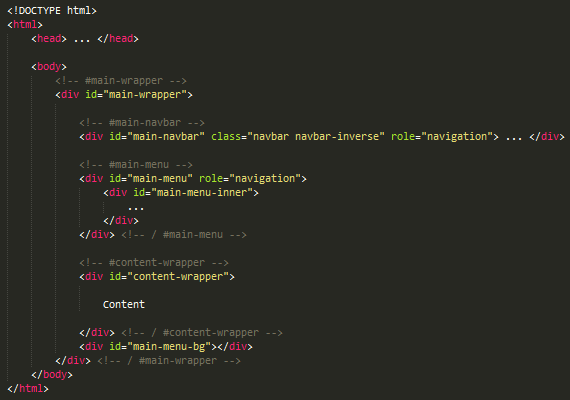
Thank you for purchasing PixelAdmin template. If you will have any questions, please feel free to email me. I can't always guarantee a solution but I will do my best to assist you. Thanks very much!
You can customize general Bootstrap variables by editing the styles/libs/bootstrap-3.1.1/variables.less file.
Also you can customize general PixelAdmin variables by editing the styles/pixel-admin.less file.
To exclude unused components, you need remove all imports of the component in the next files:
style/pixel-admin.less
style/pixel-admin-less/rtl/rtl.less
Also check used theme's less file to remove theme-specific component generators.
For example, if you want remove DatePicker styles, you need (default theme):
- open the styles/pixel-admin.less file and remove line @import './pixel-admin-less/plugins/bootstrap-datepicker.less';
- open the styles/pixel-admin-less/rtl/rtl.less file and remove line @import './plugins/bootstrap-datepicker.less';
- open the styles/pixel-admin-less/themes/default/default.less file and remove line .bootstrap-datepicker-theme(@primary-color);
In the same way you can remove widgets/pages, but additionally you need to remove imports from the styles/pixel-admin-less/widgets/widgets.less/styles/pixel-admin-less/pages/pages.less.
To change image and font paths you can edit @fonts-path and @images-path variables in the styles/pixel-admin-less/variables.less file.
You can customize general Bootstrap and PixelAdmin variables by editing the styles/pixel-admin-scss/_variables.scss file. If you want to change extra bootstrap variables - You will need to put them in this file (Bootstrap's _variables.scss must be untouched).
To exclude unused components, you need remove all imports of the component in the next files:
style/pixel-admin.scss
style/pixel-admin-scss/rtl/rtl.scss
Also check used theme's scss file to remove theme-specific component generators.
For example, if you want remove DatePicker styles, you need (default theme):
- open the styles/pixel-admin.scss file and remove line @import "./pixel-admin-scss/plugins/bootstrap_datepicker";
- open the styles/pixel-admin-scss/rtl/rtl.scss file and remove line @import "./plugins/bootstrap_datepicker";
- open the styles/pixel-admin-scss/themes/default/default.scss file and remove line @include bootstrap-datepicker-theme($primary-color);
In the same way you can remove widgets/pages, but additionally you need to remove imports from the styles/pixel-admin-scss/widgets/widgets.scss/styles/pixel-admin-scss/pages/pages.scss.
To change image and font paths you can edit $fonts-path and $images-path variables in the styles/pixel-admin-scss/_variables.scss file.
After customization you need to compile your LESS/SCSS and JavaScript sources by running the following commands from command line in the PixelAdmin directory:
- grunt compile-less
Your use of the item is restricted to a single installation.
You may use the item in work which you are creating for your own purposes or for your client.
You must not incorporate the item in a work which is created for redistribution or resale by you or your client.
The item may not be redistributed or resold.
If the item contains licensed components, those components must only be used within the item and you must not extract and use them on a stand-alone basis.
If the item was created using materials which are the subject of a GNU General Public License (GPL), your use of the item is subject to the terms of the GPL in place of the foregoing conditions (to the extent the GPL applies).
Multiple Applications License
Your use of the item may extend to multiple installations.
You may use the item in work which you are creating for your own purposes or for your clients.
You must not incorporate the item in a work which is created for redistribution or resale by you or your clients.
The item may not be redistributed or resold.
If the item contains licensed components, those components must only be used within the item and you must not extract and use them on a stand-alone basis.
If the item was created using materials which are the subject of a GNU General Public License (GPL), your use of the item is subject to the terms of the GPL in place of the foregoing conditions (to the extent the GPL applies).
Extended License
Your use of the item may extend to multiple installations.
You may use the item in work which you are creating for your own purposes or for your clients.
You may license, sublicense, redistribute, or resell the item in the following circumstances:
the item is incorporated into a larger work you have created; or
if you modify the item and resell the end product.
If the item contains licensed components, those components must only be used within the item and you must not extract and use them on a stand-alone basis.
If the item was created using materials which are the subject of a GNU General Public License (GPL), your use of the item is subject to the terms of the GPL in place of the foregoing conditions (to the extent the GPL applies).